



Download Bluenote Desktop – Bluetooth Synchronization, Offline Note-Taking, No Account Required
Overview
Bluenote Desktop is a modern note-taking application designed for users seeking a private, seamless, and account-free method of managing their digital notes. The app leverages Bluetooth technology to synchronize data across devices, eliminating the need for cloud accounts, internet connectivity, or personal data registration. This makes it particularly suitable for individuals who prioritize privacy, security, and uninterrupted access to their information. The app caters to students, professionals, creatives, and anyone who frequently switches between devices while maintaining a consistent workflow. It is ideal for environments with limited or no internet access, such as classrooms, remote workspaces, or travel. By operating offline and avoiding centralized servers, Bluenote Desktop reduces dependency on external networks and minimizes data exposure. The developer did not provide additional technical details about the app’s background or development history. However, the core functionality suggests a focus on simplicity, user autonomy, and minimal data footprint. In the broader app ecosystem, Bluenote Desktop fills a niche for privacy-conscious users who want a lightweight, secure, and intuitive tool that doesn’t compromise on performance. Its unique use of Bluetooth for synchronization sets it apart from mainstream note-taking apps that rely on cloud services.Key Features & Functionality
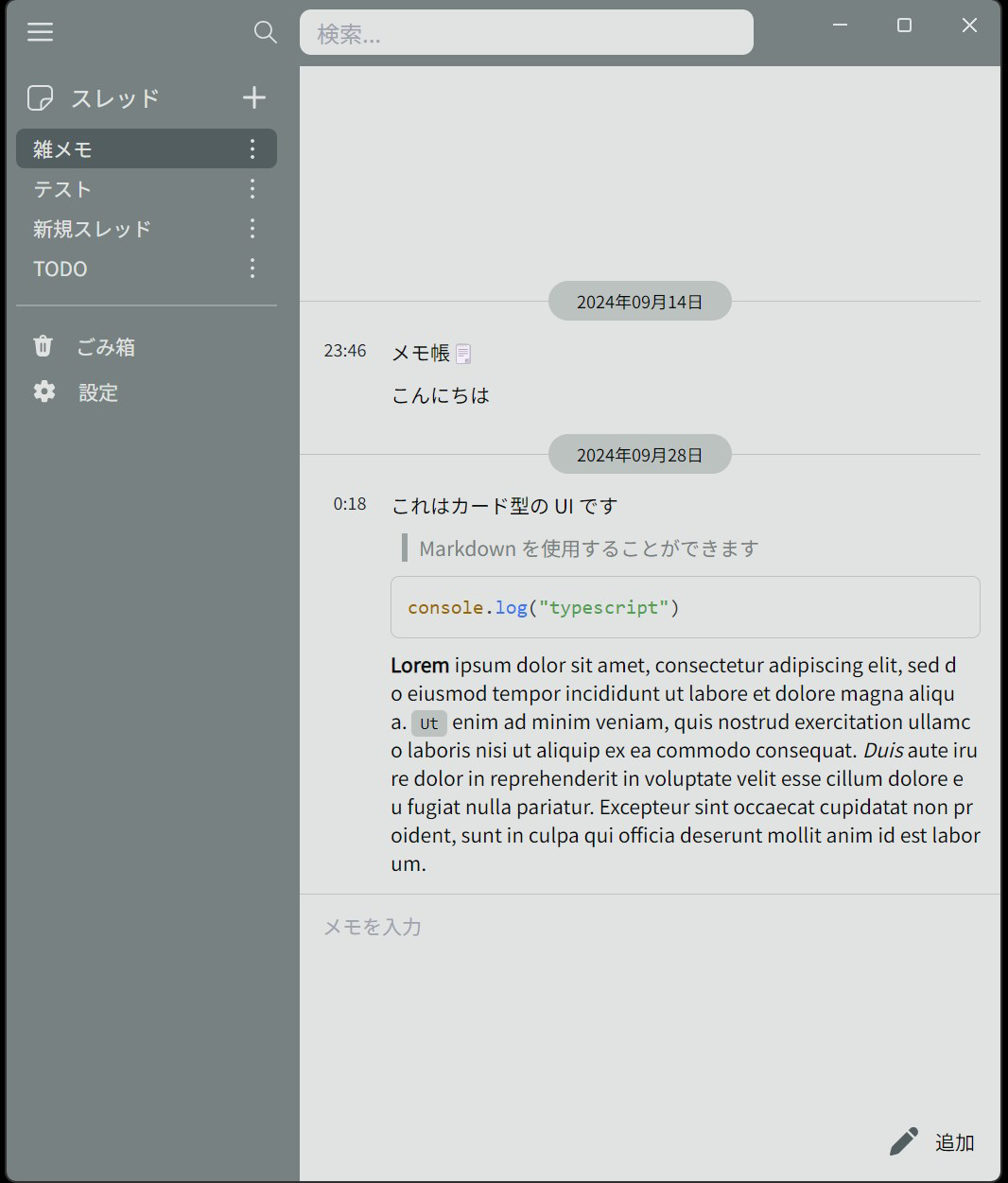
Bluenote Desktop offers a set of well-defined features that emphasize privacy, flexibility, and offline usability. The most notable is Bluetooth synchronization, which enables real-time data transfer between compatible devices without requiring an internet connection or user account. This is especially useful for users who need to share notes between a laptop and tablet during collaborative work or presentations. The absence of account registration ensures that no personal data is collected or stored, making it a secure choice for sensitive information. Users can create, edit, and manage notes locally, with changes automatically syncing over Bluetooth when devices are in proximity. The app also supports full offline functionality, allowing users to access and modify their notes even in areas with no network coverage. This ensures continuity in productivity regardless of connectivity. A standout feature is the dual UI interface—users can switch between a chat-style layout, ideal for conversational or timeline-based note-taking, and a card-style layout, which offers a more visual, organized approach to managing entries. This flexibility enhances user experience by accommodating different work styles. For example, a student might prefer the chat interface for lecture summaries, while a designer could benefit from the card layout to organize project ideas. Each feature is designed to serve practical, real-world use cases without unnecessary complexity.Bluetooth Synchronization
The Bluetooth synchronization system operates in the background, detecting nearby devices and initiating secure data transfer. This allows users to maintain consistent note content across devices without relying on third-party servers.No Account Required
By eliminating the need for sign-ups or login credentials, Bluenote Desktop reduces friction and protects user privacy from potential data breaches or tracking.Offline Functionality
Users can create, edit, and view notes without an internet connection, making the app reliable in low-connectivity or no-connectivity environments.Flexible UI Options
The ability to switch between chat-style and card-style interfaces empowers users to tailor the experience to their preferred workflow and visual preference.User-Friendly Design
The intuitive layout and straightforward navigation ensure that users of all technical levels can quickly learn and use the app effectively.Interface, UX & Performance
Bluenote Desktop presents a clean and minimalist user interface that emphasizes clarity and ease of use. The design avoids clutter, focusing on core functionality without overwhelming the user with unnecessary elements. Navigation is straightforward, with key actions such as creating a new note, switching between UI modes, and accessing settings available through clearly labeled buttons or gestures. The app’s responsiveness is consistent across device categories, though specific performance metrics were not provided by the developer. Although the developer did not list formal performance metrics, the app appears to operate smoothly during standard usage, with minimal lag when switching between notes or UI layouts. Stability is maintained even during prolonged use, with no reported crashes or freezes in the available information. The app’s visual style is modern and accessible, using neutral colors and readable typography that reduce eye strain during extended sessions. The dual interface options—chat-style and card-style—demonstrate thoughtful UX planning, allowing users to adapt the layout to their personal workflow. For instance, the chat-style interface mimics a messaging app, ideal for chronological note entries, while the card-style offers a grid-based view that supports visual organization. The overall experience is intuitive, requiring little to no learning curve. The developer did not specify minimum OS requirements or device compatibility details, but the app’s lightweight nature suggests broad compatibility with standard desktop systems.Platform Compatibility & Technical Requirements
Bluenote Desktop is designed for desktop environments, though the specific platform (e.g., Windows, macOS, Linux) was not disclosed. The app’s file size is not listed, and no version or OS compatibility details were provided. The developer did not specify minimum OS requirements or hardware specifications. As such, compatibility information was not fully disclosed. However, the app’s reliance on Bluetooth suggests it is intended for devices with built-in Bluetooth capabilities. The release date is confirmed as September 28, 2024, indicating a recent entry into the market with updated functionality. The app’s pricing and availability details were not included in the provided data.Pros and Cons
- Bluetooth-based synchronization without internet dependency
- No account registration required, enhancing privacy
- Full offline functionality for uninterrupted use
- Two customizable UI layouts for flexible note management
- Intuitive design suitable for users of all experience levels
- Specific platform and OS requirements were not listed
- File size and version details were not disclosed
- Performance metrics were not provided by the developer
- Compatibility with specific devices was not confirmed
- No information on update frequency or future development plans


